
Kafka Message Playback, Live Feed, and Filtering
Choose partitions, time or log offsets, and message filters; run finite playback or follow new records live; then inspect, sort, view, wrap, import, and export the results.
Practical workflow guides showing how Kafka Streamyard supports message investigation, live monitoring, filtering, topic discovery, reusable views, and everyday Kafka work.
Learn how to inspect Kafka records with Message Playback and Live Feed, then go deeper into topic filtering, saved presets, and reusable investigation workflows.
Choose partitions, time or log offsets, and message filters; run finite playback or follow new records live; then inspect, sort, view, wrap, import, and export the results.
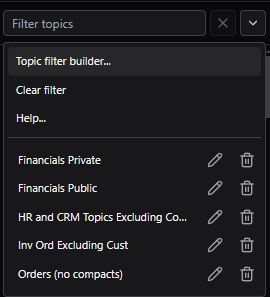
See how to move from a noisy topic list into a focused working set with quick text filters, saved presets, @ preset references, connection tags for staging and prod-like environments, and the Topic Filter Builder with AI assistance.
These posts focus on what helps when you are in a real cluster, dealing with real topic sprawl, not abstract feature lists.
Expect concrete screenshots, real filter expressions, and the UI entry points that matter when you are trying to move quickly.
We cover how the features combine in practice, including saved filters, connection tags, and when the AI builder is the fastest path.
Start with the playback and filtering guide to learn the complete path from choosing a topic and read window to inspecting and exporting matching records.
Open the playback guide